|
| ERROR CONNECTING WITH MYSQL |
| Iniciado por LUIS ALBERTO BERNAL, 22,abr. 2020 15:19 - 3 respuestas |
| |
| | | |
|
| |
Miembro registrado
7 mensajes |
|
| Publicado el 22,abril 2020 - 15:19 |
Good morning,
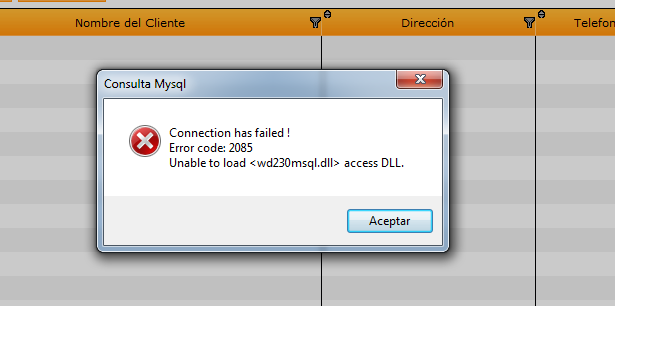
I am new to windev, I am testing by connecting to Mysql, and an error is generated. The version used is 23.
This is the code that i user.
////////
ConnectionNum is int
ConnectionNum = SQLConnect("127.0.0.1", "root", "root", "enlacevisual", "MySQL")
IF ConnectionNum <> 0 THEN
ToastDisplay("Connection Successfully")
ELSE
SQLInfo()
Error("Connection has failed !" + CR + ...
"Error code: " + SQL.Error + CR + SQL.MesError)
END
SQLDisconnect()
///////////////
Thanks,
Luis Alberto Bernal B.
Valledupar - Colombia |
| |
| |
| | | |
|
| | |
| |
| Publicado el 29,abril 2020 - 06:57 |
Hi,
Two things to do :
1- Install Native Access of MySQL (From PCSoft Website)
2- Put libmysql.dll (from your MYSQL) beside your Application folder |
| |
| |
| | | |
|
| | |
| |
Miembro registrado
27 mensajes |
|
| Publicado el 29,octubre 2020 - 13:42 |
Hi,
I am using WebDev 19 and facing similar issue, can not connect to MySql database. I get error 27, which states that the client layer may not installed properly.
Already put libmysqld.dll files to webdev installation folder and into Programs, and Framework folder. Even into c://windows and c://windows/system32. Still does not work. Any possible solutions?
Thanks in advance
How to do this step bellow?
2- Put libmysql.dll (from your MYSQL) beside your Application folder
Where can I find Application folder?
I am using MySql 5.7.12 server, but also tried the newest version and have installed Native Access of MySQL. |
| |
| |
| | | |
|
| | |
| |
Miembro registrado
27 mensajes |
|
| Publicado el 30,octubre 2020 - 08:32 |
| In the case if anyone enters the similar or same error I found the solution. Installed Webdev was 32bit version, and app would not recognize .dll files. Just installed 64 bit version and the native connection works. |
| |
| |
| | | |
|
| | | | |
| | |
|