|
| Iniciado por TheCout, 17,dic. 2019 15:12 - 18 respuestas |
| |
| | | |
|
| |
Miembro registrado
104 mensajes |
|
| Publicado el 17,diciembre 2019 - 15:12 |
Bonjour,
Pour un système d'aide, j'aimerais mettre un champ image au-dessus de tous les autres champs de la fenêtre (qui recouvre donc toute la fenêtre).
Ce champ image serait semi-opaque pour laisser voir un peu les champs en-dessous sauf un trou pour voir un champ spécifique. Ce champ spécifique serait ainsi mis en évidence. Je ne sais pas si vous voyez ce que je veux dire...
Est-il possible de faire cela ? Ou d'une autre manière ?
Cordialement. |
| |
| |
| | | |
|
| | |
| |
| Publicado el 18,diciembre 2019 - 15:28 |
Bonjour,
Alors un code très rapide...
Créer 4 champs de type images (IMG_1, IMG_2, IMG_3 et IMG_4)
Puis créer un bouton avec le code suivant dans l'événement clic :
IMG_1..Visible = Vrai
IMG_2..Visible = Vrai
IMG_3..Visible = Vrai
IMG_4..Visible = Vrai
IMG_1..Opacité = 50
IMG_2..Opacité = 50
IMG_3..Opacité = 50
IMG_4..Opacité = 50
IMG_1..CouleurFond = GrisClair
IMG_2..CouleurFond = GrisClair
IMG_3..CouleurFond = GrisClair
IMG_4..CouleurFond = GrisClair
IMG_1..X = 0
IMG_1..Y = 0
IMG_1..Hauteur = <Champ>..Y
IMG_1..Largeur = MaFenêtre..Largeur
IMG_2..X = 0
IMG_2..Y = <Champ>..Y+<Champ>..Hauteur
IMG_2..Hauteur = MaFenêtre..Hauteur-(<Champ>..Y+<Champ>..Hauteur)
IMG_2..Largeur = MaFenêtre..Largeur
IMG_3..X = 0
IMG_3..Y = 0
IMG_3..Hauteur = MaFenêtre..Hauteur
IMG_3..Largeur = <Champ>..X
IMG_4..X = <Champ>..X+<Champ>..Largeur
IMG_4..Y = 0
IMG_4..Hauteur = MaFenêtre..Hauteur
IMG_4..Largeur = MaFenêtre..Largeur-(<Champ>..X+<Champ>..Largeur) |
| |
| |
| | | |
|
| | |
| |
Miembro registrado
104 mensajes |
|
| Publicado el 19,diciembre 2019 - 09:16 |
Bonjour et merci pour la réponse 
Effectivement, ce que tu proposes c'est d'entourer le champ avec 4 rectangles. Je n'avais pas pensé à cette possibilité...
Mais bon si je veux mettre plusieurs champ en évidence ou avec une ellipse plutôt que un rectangle ou ajouter du texte dTexte par exemple...
En fait, je pense qu'il manque une fonction de suppression dans les fonctions de dessin de Windev. Par exemple, il faudrait, à la place d'une couleur dans ces fonctions de dessin, proposer une constante "Suppression", du genre:
dRectangle(IMG,x,ylargeur,hauteur,Suppression,Suppression)
Ce serait vraiment cool ! J'ai soumis cela à PC Soft. On verra bien. |
| |
| |
| | | |
|
| | |
| |
Miembro registrado
324 mensajes |
|
| Publicado el 19,diciembre 2019 - 09:53 |
>>En fait, je pense qu'il manque une fonction de suppression dans les fonctions de dessin de Windev. ?
Oui ou alors vous donner comme couleur à votre réctangle la meme que la couleur de fond et ca efface 
Si je dessine une ligne rouge sur fond blanc, et que je souhaites l'effacer, je redessine au même coordonnées la ligne en blanc et ca "supprime" la ligne rouge ^^.
PCSoft ne peut pas tout pré-maché non plus |
| |
| |
| | | |
|
| | |
| |
Miembro registrado
52 mensajes |
|
| Publicado el 19,diciembre 2019 - 12:10 |
first of all: sorry for not writing in french.
You can use a big image with a hole in the middle, place it at top zorder, then you can move it whenever you wnat and you will see controls thru its hole, and if you set opacity of the image to 50, the rest of controls should be semihidden
This way you can have a circular hole, a heart shape hole, whatever you need !!!
if needed I can send you a sample
good luck !Mensaje modificado, 19,diciembre 2019 - 12:14 |
| |
| |
| | | |
|
| | |
| |
Miembro registrado
104 mensajes |
|
| Publicado el 19,diciembre 2019 - 13:56 |
Oui mais en fait, en-dessous, ce n'est pas simplement le fond de la fenêtre que je veux mettre en évidence mais un bouton par exemple ou n'importe quel champ.
Çà revient à faire comme un logiciel de dessin : sélectionnner une zone rectangulaire et l'effacer. Je ne vois pas en quoi ce serait si sorcier à faire de la part de PC Soft... |
| |
| |
| | | |
|
| | |
| |
Miembro registrado
104 mensajes |
|
| Publicado el 19,diciembre 2019 - 14:02 |
BALTASAR a écrit :
first of all: sorry for not writing in french.
You can use a big image with a hole in the middle, place it at top zorder, then you can move it whenever you wnat and you will see controls thru its hole, and if you set opacity of the image to 50, the rest of controls should be semihidden
This way you can have a circular hole, a heart shape hole, whatever you need !!!
if needed I can send you a sample
good luck !
Message modifié, 19 décembre 2019 - 12:14
Thanks BALTASAR for your message.
This solution works but it is not flexible : if I want to hide many fileds, it is not possible.
The best solution would be to be able to erase parts of an image. But apparently it is not possible at the moment. |
| |
| |
| | | |
|
| | |
| |
Miembro registrado
310 mensajes |
|
| Publicado el 19,diciembre 2019 - 14:04 |
Le plus simple est tout de même de créer un PNG semi-transparent, d'évider le centre.
Il suffira d'afficher cette image (en premier plan) centrée sur vos champs.
Exemple d'image (vous pouvez l'essayer) :

Bon dev. |
| |
| |
| | | |
|
| | |
| |
Miembro registrado
104 mensajes |
|
| Publicado el 19,diciembre 2019 - 14:30 |
Samir BOUCHETIBAT a écrit :
Le plus simple est tout de même de créer un PNG semi-transparent, d'évider le centre.
Il suffira d'afficher cette image (en premier plan) centrée sur vos champs.
Exemple d'image (vous pouvez l'essayer) :
Bon dev.
OK mais comment le faire par code ? Il faudrait, pour cela:
. créer un grand cercle de couleur bleu (avec dCercle)
. faire un plus petit cercle à l'intérieur du précédent. Mais quelle couleur utiliser ? Si on utilise "Transparent", rien n'est dessiné en fait et le cercle n'est pas évidé. |
| |
| |
| | | |
|
| | |
| |
Miembro registrado
52 mensajes |
|
| Publicado el 19,diciembre 2019 - 14:35 |
in your first message you said "hide all except an specific item", with my idea you hide all excepts one.
Another way is to make a full screen mesh with holes on every item you want to hide/show and many little patchs to hide/show them |
| |
| |
| | | |
|
| | |
| |
Miembro registrado
310 mensajes |
|
| Publicado el 19,diciembre 2019 - 14:46 |
Question : pourquoi vouloir le faire par code ?
Rien ne vous empêche de redimensionner l'image, la placer ou vous voulez par code, mais pourquoi vouloir absolument la créer par code ?
Bon dev. |
| |
| |
| | | |
|
| | |
| |
Miembro registrado
104 mensajes |
|
| Publicado el 19,diciembre 2019 - 14:51 |
Samir BOUCHETIBAT a écrit :
Question : pourquoi vouloir le faire par code ?
Rien ne vous empêche de redimensionner l'image, la placer ou vous voulez par code, mais pourquoi vouloir absolument la créer par code ?
Bon dev.
Je me cite moi-même un peu plus haut  : :
>> Mais bon si je veux mettre plusieurs champ en évidence ou avec une ellipse plutôt que un rectangle ou ajouter du texte dTexte par exemple... |
| |
| |
| | | |
|
| | |
| |
Miembro registrado
52 mensajes |
|
| Publicado el 19,diciembre 2019 - 15:12 |
I give you an example, try it, maybe it helps:
(just creat a new window, name it "WIN_HIDE", add many controls like buttons, editcontrols, statics, table ...) then insert this code in a button and check it !
nSubscript is int = 1
sNameChildControl is string
sControlInfo is string = gpwEnumControl("Win_HIDE", nSubscript)
WHILE sControlInfo <> ""
sNameChildControl = ExtractString(sControlInfo, 1, TAB)
IF NOT Contains(sNameChildControl,".") _AND_ NOT Contains(sNameChildControl,"IMG_") THEN
PatchName is string = "Patch_"+sNameChildControl
ControlCreate(PatchName,typImage, {sNameChildControl, indControl}..X, {sNameChildControl, indControl}..Y, {sNameChildControl, indControl}..Width, {sNameChildControl, indControl}..Height, True)
{PatchName, indControl}..BackgroundColor=Black
{PatchName, indControl}..ZOrder=1000
END
nSubscript++
sControlInfo = gpwEnumControl("Win_HIDE", nSubscript)
END Mensaje modificado, 19,diciembre 2019 - 15:19 |
| |
| |
| | | |
|
| | |
| |
Miembro registrado
52 mensajes |
|
| Publicado el 19,diciembre 2019 - 15:55 |
change:
{PatchName, indControl}..BackgroundColor=Black
to:
{PatchName, indControl}..BackgroundColor=WIN_HIDE..BackgroundColor
it works better !Mensaje modificado, 19,diciembre 2019 - 15:55 |
| |
| |
| | | |
|
| | |
| |
Miembro registrado
104 mensajes |
|
| Publicado el 19,diciembre 2019 - 16:04 |
BALTASAR a écrit :
change:
{PatchName, indControl}..BackgroundColor=Black
to:
{PatchName, indControl}..BackgroundColor=WIN_HIDE..BackgroundColor
it works better !
Message modifié, 19 décembre 2019 - 15:55
I understand your code : you create one image for each control to highlight.
But I want the inverse : colorize the whole window but NOT specific controls. |
| |
| |
| | | |
|
| | |
| |
Miembro registrado
52 mensajes |
|
| Publicado el 19,diciembre 2019 - 16:08 |
I create one image for each control to HIDE
TheCout wrote:
I understand your code : you create one image for each control to highlight.
But I want the inverse : colorize the whole window but NOT specific controls.
You have it: hide all controls excepts those that you want to be visibleMensaje modificado, 19,diciembre 2019 - 16:16 |
| |
| |
| | | |
|
| | |
| |
| Publicado el 20,diciembre 2019 - 07:37 |
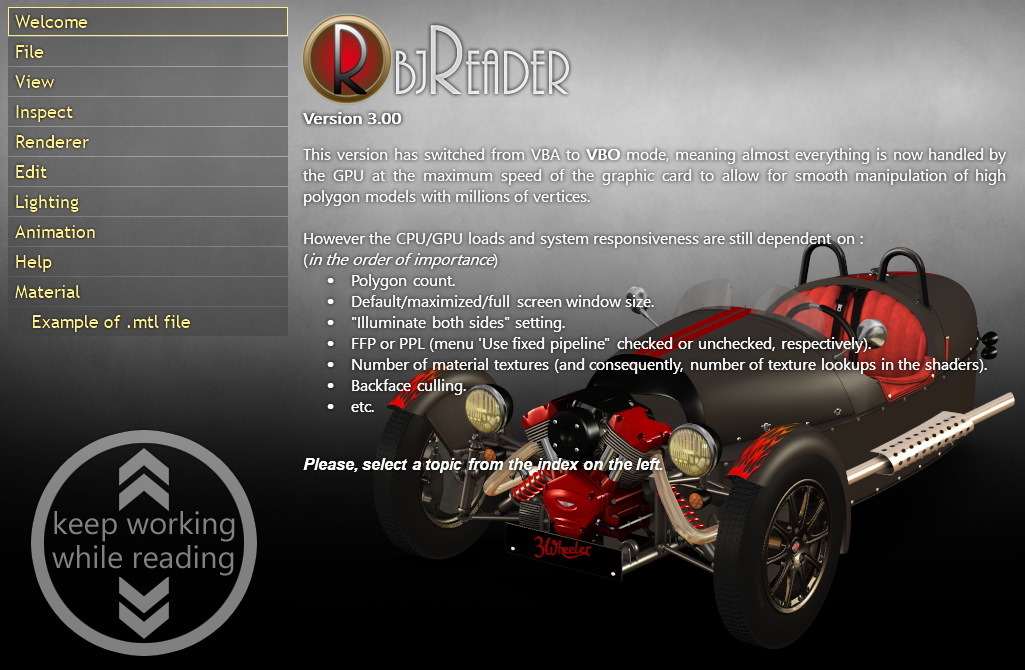
En ce qui me concerne j'utilise des png transparents en mode DWM composé (bibliothèque graphique externe).
Ce qui me permet d'obtenir ce résultat
|
| |
| |
| | | |
|
| | |
| |
Miembro registrado
104 mensajes |
|
| Publicado el 23,diciembre 2019 - 12:07 |
Patrice TERRIER a écrit :
En ce qui me concerne j'utilise des png transparents en mode DWM composé (bibliothèque graphique externe).
Ce qui me permet d'obtenir ce résultat
Tu aurais un lien vers cette bibliothèque graphique externe ? |
| |
| |
| | | |
|
| | |
| |
| Publicado el 23,diciembre 2019 - 16:56 |
Faites une recherche sur Google avec les mots clés
"windev gdimage"
et demandez à afficher le images |
| |
| |
| | | |
|
| | | | |
| | |
|