|
| Iniciado por VEGEboss, 23,dic. 2019 18:03 - 1 respuesta |
| |
| | | |
|
| |
Miembro registrado
88 mensajes |
|
| Publicado el 23,diciembre 2019 - 18:03 |
hello folks
please consider this very small piece of code
HImportXLS(Shoes_Tag, My_Excel_File, 1, "", hImpTestDuplicates+hImpIgnoreFirstLine)
IF ErrorOccurred THEN
Error(HErrorInfo())
END
and the structure os the related table (I don't know if can be useful, anyway here it is)
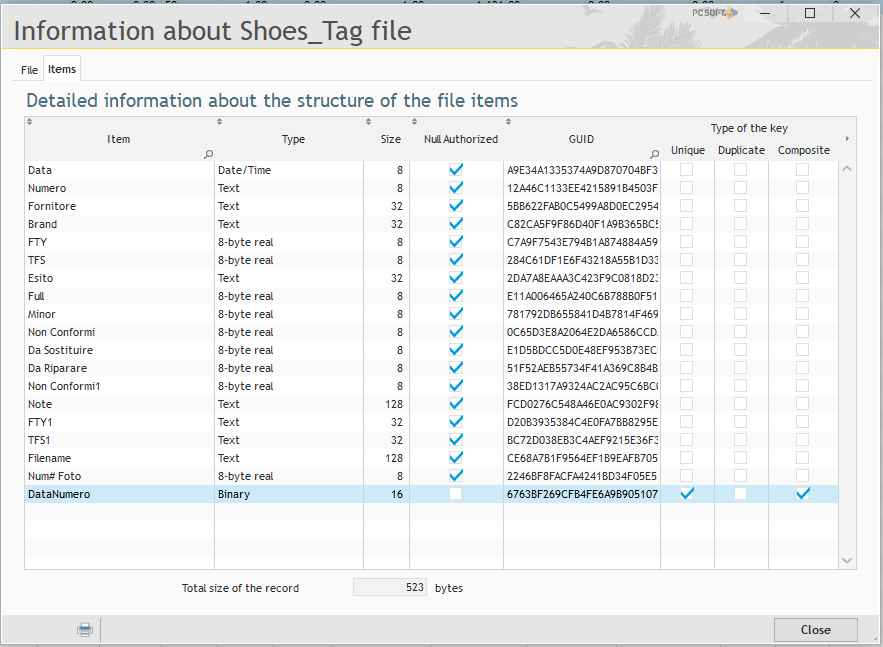
my problem is: every time the code above is launched, Windev add ALL the rows of the Excel sheet without any regard to the Unique Key (DataNumero, the last row in the picture) defined inthe table structure.
1) the file Excel and the .FIC table has the same structure
2) at every run I don't receive any error message and the table is re-re-re-re-filled with ALL the Excel rows
3) I think that, when importing data, Windev has to do ALL the "dirty work", automatic fillng the keys and checking the index
Where am I doing wrong? |
| |
| |
| | | |
|
| | |
| |
| Publicado el 27,diciembre 2019 - 16:12 |
Hi VEGEboss,
"hImpTestDuplicates" will only avoid to have duplicates if you use it with "hCopyAutoId" (hCopyAutoId+hImpTestDuplicates).
So this option won't help.
1) The easiest way to do it is to use "hImpCreation", all the rows of your file will be deleted and re-created.
2) If you want to import only the last rows. You have to use an intermediate file:
HImportXLS(Shoes_Tag_Intermediate, My_Excel_File, 1, "", hImpCreation+hImpIgnoreFirstLine)
When this intermediate file is created:
- Get the highest ID of "Shoes_Tag"
- Then, for all rows of "Shoes_Tag_Intermediate" where ID > Highest ID of "Shoes_Tag", HCopyRecord(Shoes_Tag,Shoes_Tag_Intermediate)
Could it help?
Regards
Olivier |
| |
| |
| | | |
|
| | | | |
| | |
|